Vagaro, Square Appointments, and Meevo all handle the same core jobs: online booking, checkout, client records, staff and inventory management, and reporting. But they differ in a few key ways:
- How much daily work it eliminates for your staff. For example, does the waitlist book open slots itself, or is part of the labor still left for the front desk?
- How much it helps to increase revenue. Add-on prompts at booking, membership management, and no-show protection are the kinds of tools that lift your average ticket and steady your monthly income.
- How smoothly each visit goes for your clients. Small details like a client being recognized when they walk in, or a fast and easy checkout, shape how they feel about the whole appointment.
- What features come standard, what costs extra, and what’s missing entirely. The lowest advertised price can turn into the highest monthly bill once you include all the add-ons.
Those differences matter because they affect which businesses each platform fits best.
Square Appointments covers the essentials without as many advanced features. This works well for solo providers who may not need as many tools to start with. Its free plan also makes it an accessible entry-level software.
Vagaro has a slightly deeper feature set that suits small teams, though many of its tools come as separate monthly add-ons. The software also offers a marketplace that can help businesses reach new clients, but it lists your competitors on the same page, so you’re competing on whoever’s offer looks best that day.
Meevo’s tools are more robust. They automate more of the scheduling, client, and business management work that comes with running an established, busy salon or spa with multiple service providers.
To help you make the right choice that fits your business, we compare all three platforms across nine areas:
- Pricing
- Booking
- Payments and POS
- Client retention and memberships
- Reporting
- Staff and inventory management
- Marketing tools
- Onboarding and support
- Reviews from real users
But before comparing the platforms, it helps to understand what to look for in each category.
Curious whether Meevo fits your salon or spa? Schedule a demo with our team.
Factors to Consider When Comparing Your Options
A feature list alone doesn’t tell you whether a platform is the right fit. Each category has different factors that matter depending on your business size, goals, and needs.
- Pricing: An à la carte approach may work well for solo providers who only need a few tools, but add-ons can quickly increase costs as more features become necessary. What’s included at each price tier also matters, since entry-level, mid-tier, and premium plans can look very different across platforms.
- Booking: All three platforms handle the basic aspects of booking. But more sophisticated features, like a fully automated wait list and intelligent scheduling tools that optimize appointment timing, can have a bigger impact on how full your calendar stays when you’re managing more staff and clients.
- Payments and POS: For a solo service provider, basic payment processing may be enough. For a busy salon or spa, details like fast checkout, reliable uptime, and chargeback support become more valuable for both revenue and the client experience.
- Client retention and memberships: Retention tools may not be a top priority when a business is just getting started, but they become increasingly important as a client base grows. Personalized reminders and well-managed membership programs can help turn occasional visits into repeat appointments and create a more predictable revenue stream. And the more these tools automate tasks like applying package benefits and updating client information, the less manual work for staff.
- Reporting: As a business grows, reporting becomes just as much about tracking the numbers as it is about understanding the trends behind them. A solo service provider rarely needs more than the basics, but an established salon benefits from deeper tools that support decisions about staffing, pricing, and retention.
- Staff and inventory management: Managing one calendar and a small product shelf is very different from coordinating multiple providers, schedules, commissions, and inventory levels. Larger operations need software that can manage more of these processes with less hands-on effort.
- Marketing tools: Marketing needs depend on the stage of your business. New salons and spas often find more value in tools that improve visibility and reach new customers, while established salons benefit more from automation that helps nurture relationships and increase repeat visits.
- Onboarding and support: Solo providers and new businesses don’t usually have much to set up, so lighter onboarding is enough. Larger teams have more to import and more people to train, which is where hands-on onboarding becomes especially useful. Ongoing support that’s responsive and genuinely helpful matters for businesses of any size.
With that in mind, here’s what each platform actually offers, starting with Meevo.
Meevo: Industry-Specific Software for Established Salons & Spas
Meevo is an all-in-one platform designed around how a salon or spa with five or more service providers operates. Because it primarily serves those industries, the software comes with tools that matter to them, like color formulas saved on client profiles or appointment times that adjust to how long each client actually takes.
Day to day, that means the platform helps keep the calendar full, speeds up checkout, and automates more of the work behind daily operations. And the same system works to increase revenue.
For example, our booking add-on prompts can raise the average ticket by 10–20%.
Pricing
Meevo’s salon and spa prices fall in three flat tiers:
- Lite is $129 per month for up to five users. It includes the working core of the platform: scheduling, branded online booking, client and staff management, inventory, memberships, gift cards and packages, marketing by email and text, live support, and full implementation with training.
- Essentials is $229 per month with no user cap, and adds online presence management, the MeGo client app, self-check-in, and advanced inventory controls.
- Premier is $329 per month with unlimited users. It adds the BI mobile app for business reporting, the MyMeevo employee app, advanced online presence management, and API access.
Next to Vagaro or Square’s starting prices, Meevo can look like the pricier option. But once you’re paying for the add-ons and tiers a staffed salon needs, you often end up paying the same or more.
Matching prices don’t always mean matching capabilities, either. Some features included even in Meevo’s base tier, like a team that manages chargeback disputes on your behalf, aren’t available on Vagaro or Square at any price.
Throughout this comparison, any Meevo feature mentioned is included in every tier unless a specific tier is mentioned.
Booking
Meevo’s booking tools are user-friendly and automate work that would otherwise fall on your team. And clients notice the difference. A front desk that isn’t buried in admin can actually pay attention to them.
- Clients can book 24/7 on your own website, under your branding and service descriptions. You can also put a “Book Online” button on your Google Search and Maps listings. Businesses using Meevo’s online booking turn 60% more visitors into confirmed appointments.
- The appointment book is color-coded and drag-and-drop, so you can quickly see how booked each provider is and move appointments around as needed. Icons on the book flag client details (like first visit or a membership), so your team knows who’s walking in and can personalize the greeting.
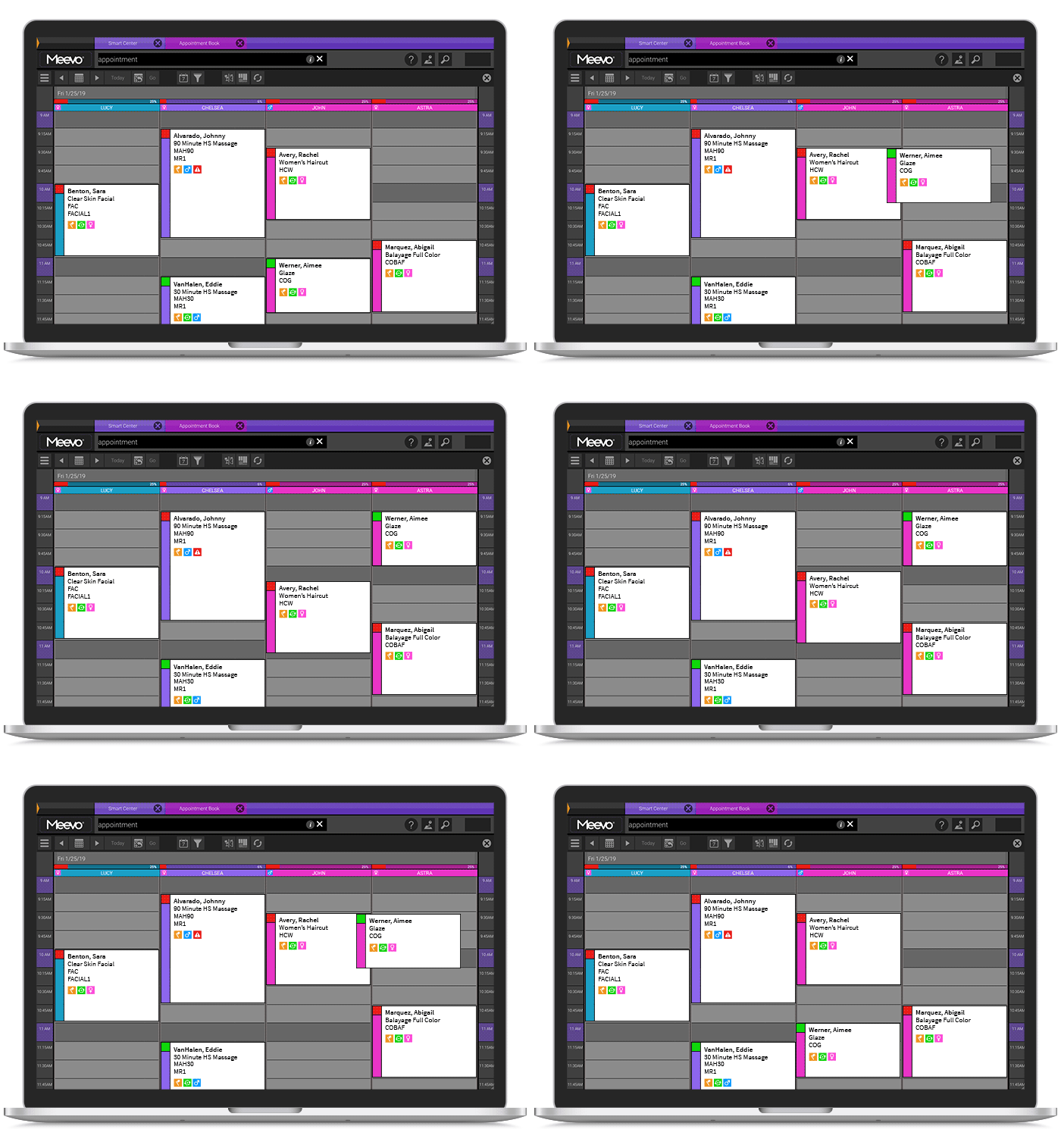
- Clients can book for a group of up to five, adding each guest and their services, and Meevo assigns the providers, rooms, and chairs so nothing conflicts.
- Add-on prompts during online booking suggest a related service before the client confirms, like a deep conditioning treatment to go with a haircut.
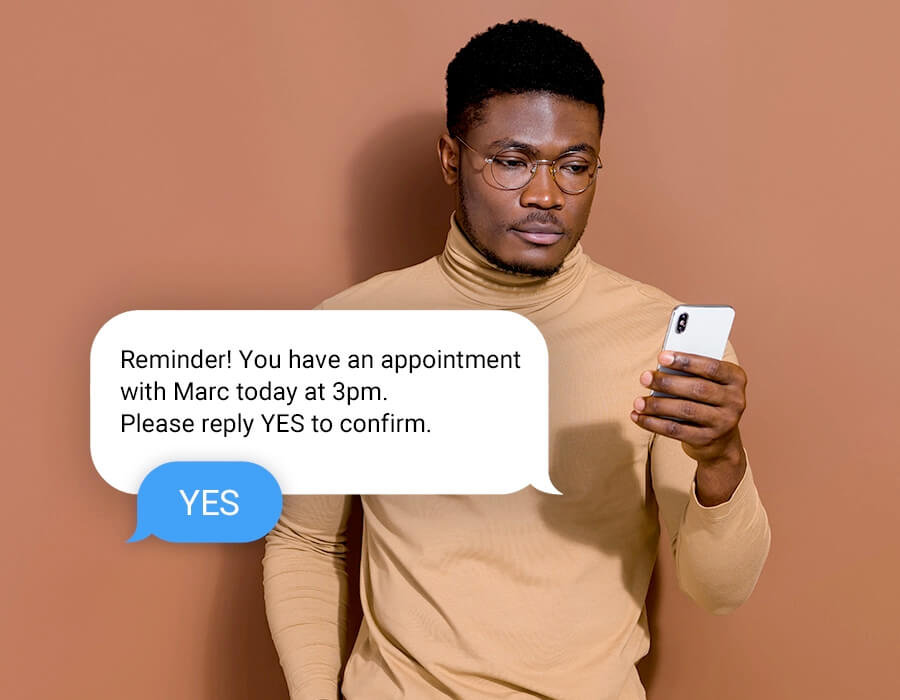
- Confirmations and reminders go out by text or email as soon as an appointment is booked. Clients can reschedule themselves through a direct link, and you can customize the reminder wording. Your front desk sees who hasn’t confirmed and can follow up while there’s still time to fill the slot.
- Deposits, cards on file, and cancellation policies are built into the booking process. Clients agree to your terms as they book, and Meevo enforces them without your staff having to bring it up. Salons that require deposits see almost no no-shows, and Meevo’s booking tools cut no-shows by up to 20% overall.
- Clients can conveniently check in from their phone when they arrive, which notifies their service provider and keeps the reception area clear (Essentials tier and up).
The rest of the booking tools work on the staff side of the calendar, where the job is keeping the book full and accurate without having to manage all of it manually.
- The wait list fills cancellations on its own. Meevo checks the appointment book every five minutes for openings, texts wait-listed clients one at a time until someone claims the slot, and books the appointment itself (unless the client requests a call). You can flag regulars as VIP so they get first notice, which rewards your most loyal clients without anyone else on the list knowing.
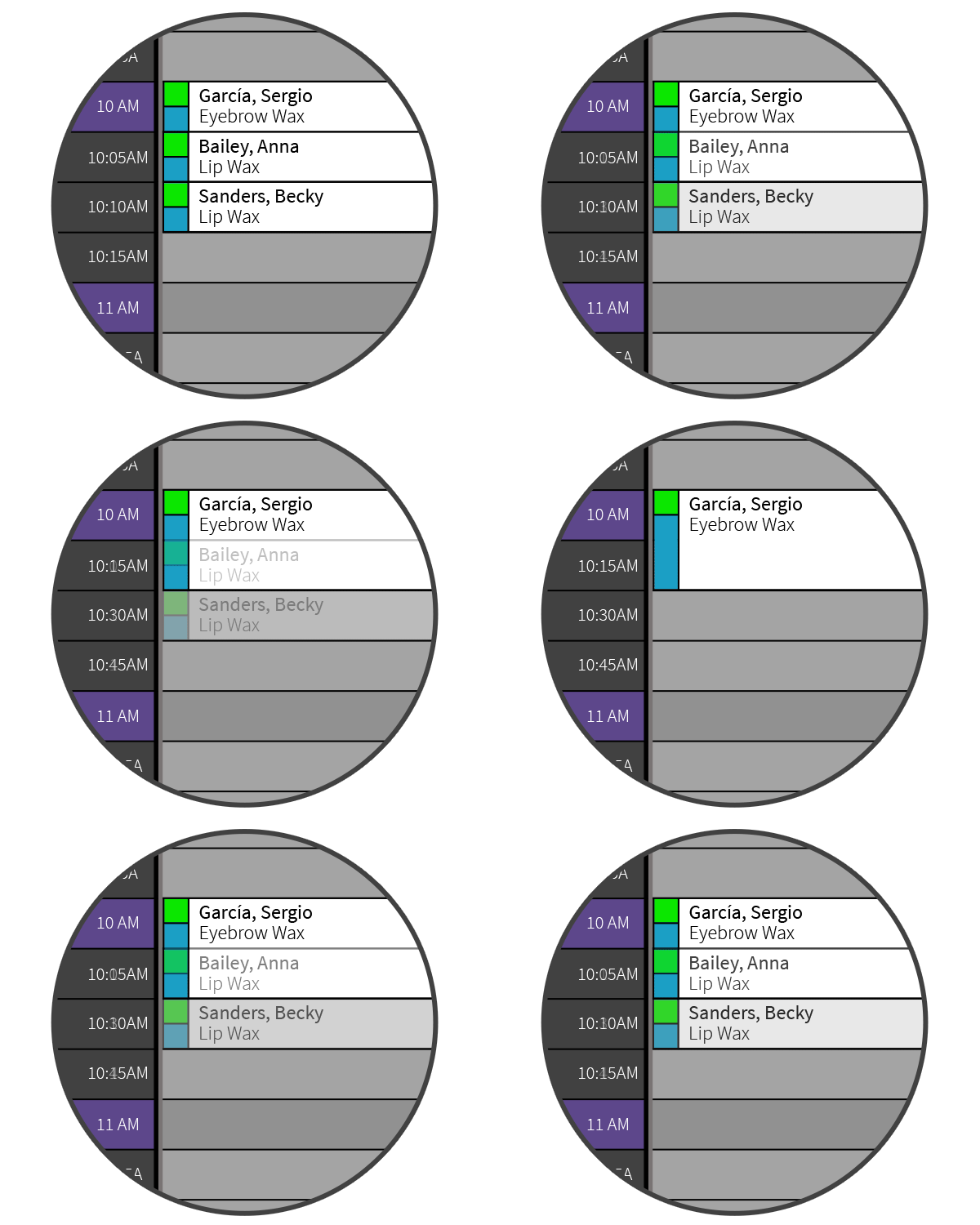
- Meevo’s Intelli-Booking feature learns how long each client actually takes for a given service. If someone only needs 30 minutes for a cut you normally block for an hour, Meevo asks once whether to save that timing, then uses it every time that client books with that provider. Short services can be booked in five- or ten-minute increments, so a lip wax doesn’t take up a whole half-hour slot.
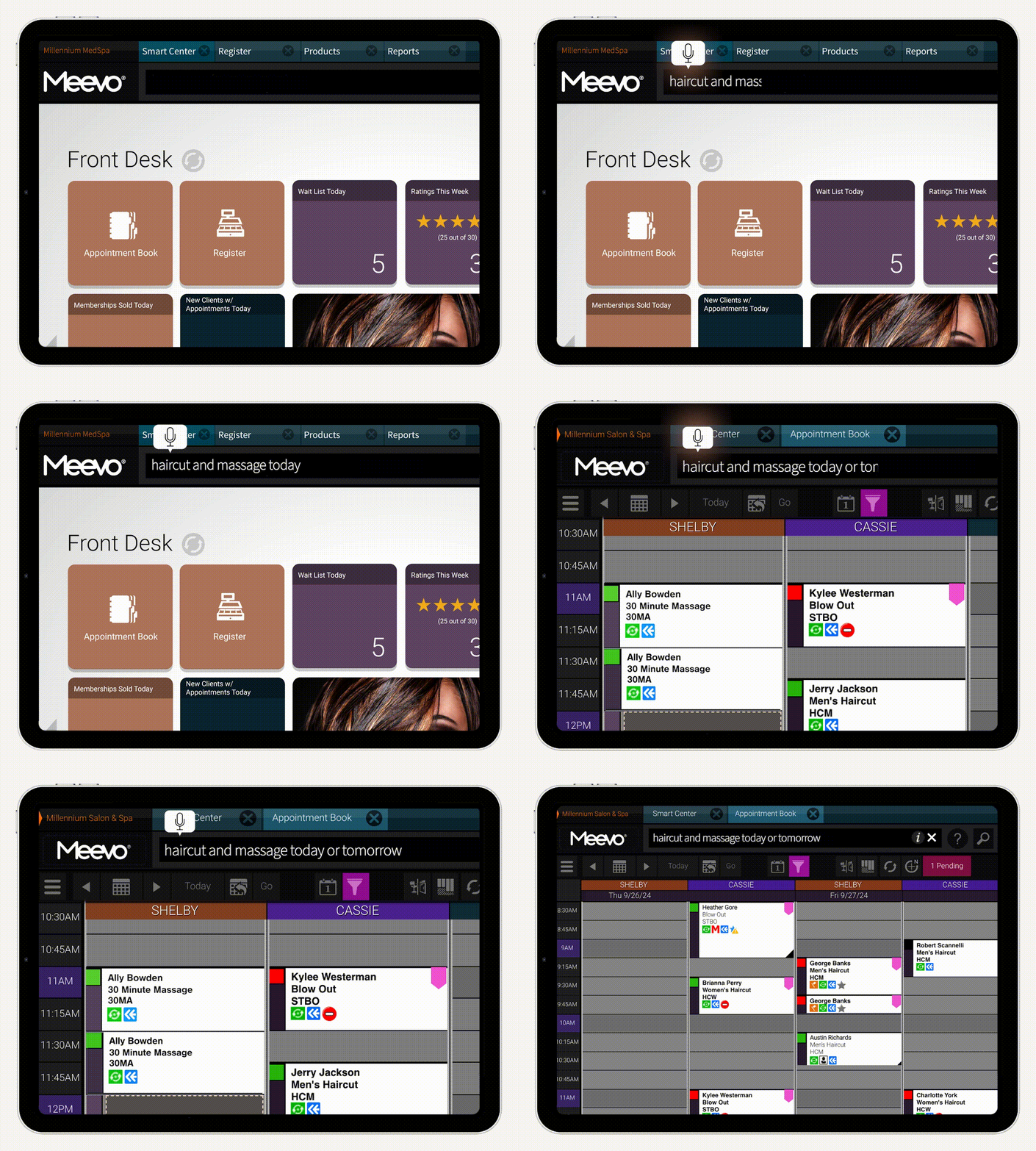
- Convobar® is Meevo’s patented AI-powered search bar that gets staff to anything in the platform without clicking through menus. They type or speak what they want in plain language, whether they say “brow tint with Anne on Thursday” or “tomorrow’s schedule.”
- Built-in resource management keeps rooms and equipment from being double-booked. If you have five massage therapists and four treatment rooms, Meevo won’t put a fifth massage on the book even when a therapist is free. You can also define what each room can handle, so a couples massage only books into a room that fits two.
Payments and POS
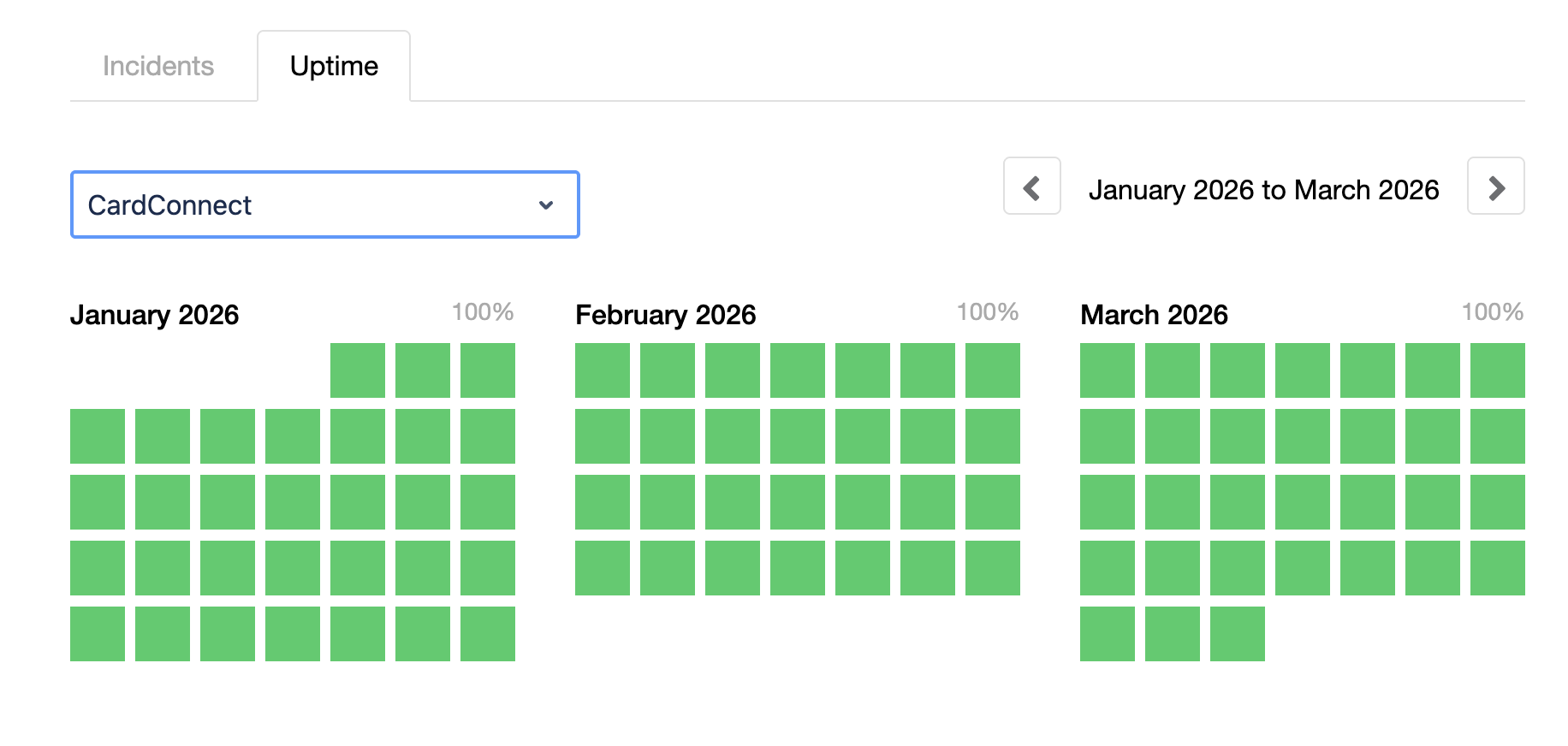
Meevo uses in-house payment processing with MeevoPay, and your first terminal is free. Our uptime is 99.95% (and in practice even higher), which means clients never wait to pay at a register that won’t load.
Beyond the transaction itself, MeevoPay does a lot of the work your front desk would otherwise have to do themselves. Because it’s built into Meevo rather than connected through an outside processor, all payments feed straight into the rest of the system.
- Everything the client owes is already on the screen when they reach checkout, including services, add-ons, retail, package balance, and membership pricing. Your staff doesn’t have to re-enter anything or look up what a member is supposed to pay. Checkout takes three clicks and a tap, and MeevoPay accepts tap, chip, and swipe, plus Apple Pay and Google Pay.
- Two prompts appear at checkout, one for the next appointment and one for retail. The rebooking screen comes up with the provider’s openings already showing, so the next visit goes on the books while the client is still standing there. Meevo also tracks what a client has bought before and flags when they’re due for more, which gives staff something specific to recommend instead of a generic upsell.
- Clients can pay chairside on a tablet or from their phone through a Self-Pay link. This helps reduce crowding at the front desk and makes checkout more convenient for clients.
- MeevoTips puts suggested tip amounts in front of the client at checkout, pushing average tips up by more than 22%. Tips go into the service provider’s digital wallet the same day instead of on the next paycheck, a perk that helps you hold onto good staff.
- MeevoPay fights chargebacks for you. Our team takes the dispute from filing to resolution, and they win around 53% of them against an industry average of 35 to 40%. MeevoPay Shield is our built-in fraud protection that flags suspicious transactions before they go through, which keeps Meevo’s overall chargeback rate below 0.02%.
Client Retention and Memberships
Managing memberships and loyalty programs is usually a manual job for the front desk. In Meevo, they mostly run themselves.
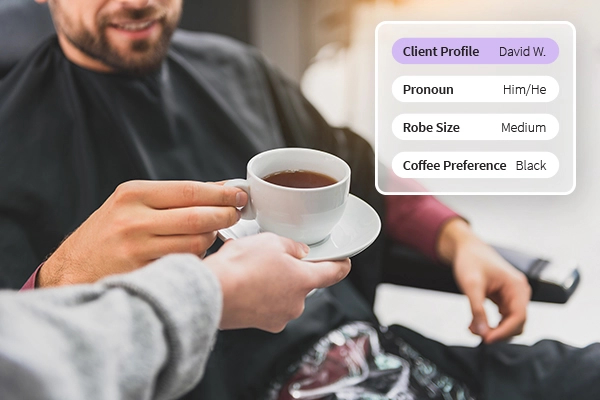
- Every client has one record, no matter who serves them or which location they visit. It holds visit history, color formulas, notes, preferences, membership details, and lifetime spend, so the details are there whenever anyone needs them. Meevo’s Intelli-Merge feature catches duplicate profiles and prompts you to merge them, keeping the system clean and organized.
- Meevo applies membership benefits without staff entering them by hand. Discounted pricing comes off at checkout, membership status shows on the appointment book before the client walks in, and members can redeem accrued services at any of your locations.
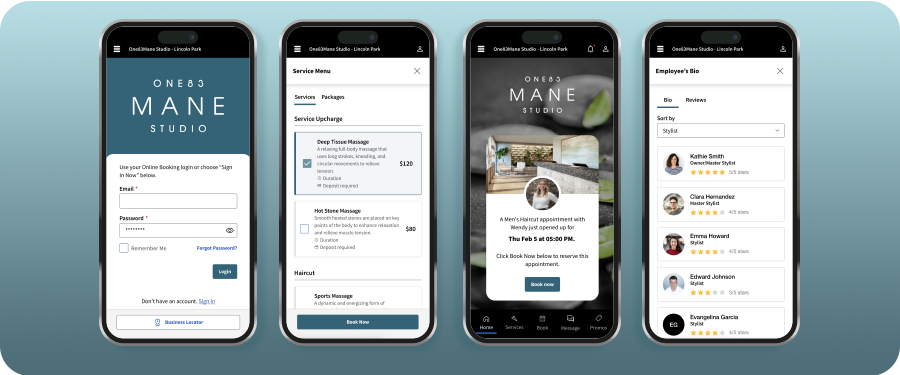
- MeGo is Meevo’s client-facing app under your own branding. It gives clients a convenient place to book, buy retail and gift cards, and message your team directly. Unused package balances and loyalty points sit right there where clients see them, which can help get them back in the chair. (Essentials tier and up)
- Cards on file update themselves if a client’s card is reissued or expires, which keeps billing for membership and packages active instead of failing quietly and landing on your front desk. This works for cards from participating banks.
- Clients can easily swap or split what their membership covers. A member can trade a deep conditioning treatment for a blowout, or break a 90-minute massage into three 30-minute visits, and Meevo tracks the balance at the register.
Reporting
Meevo’s reporting tools are deep, with a large library of reports covering nearly every part of the business. And because everything happens in one system, the numbers fill in and stay current on their own.
- More than 150 reports come built in and ready to run. You don’t have to decide what to measure or where to pull it from (the way you would with custom reports you have to build yourself).
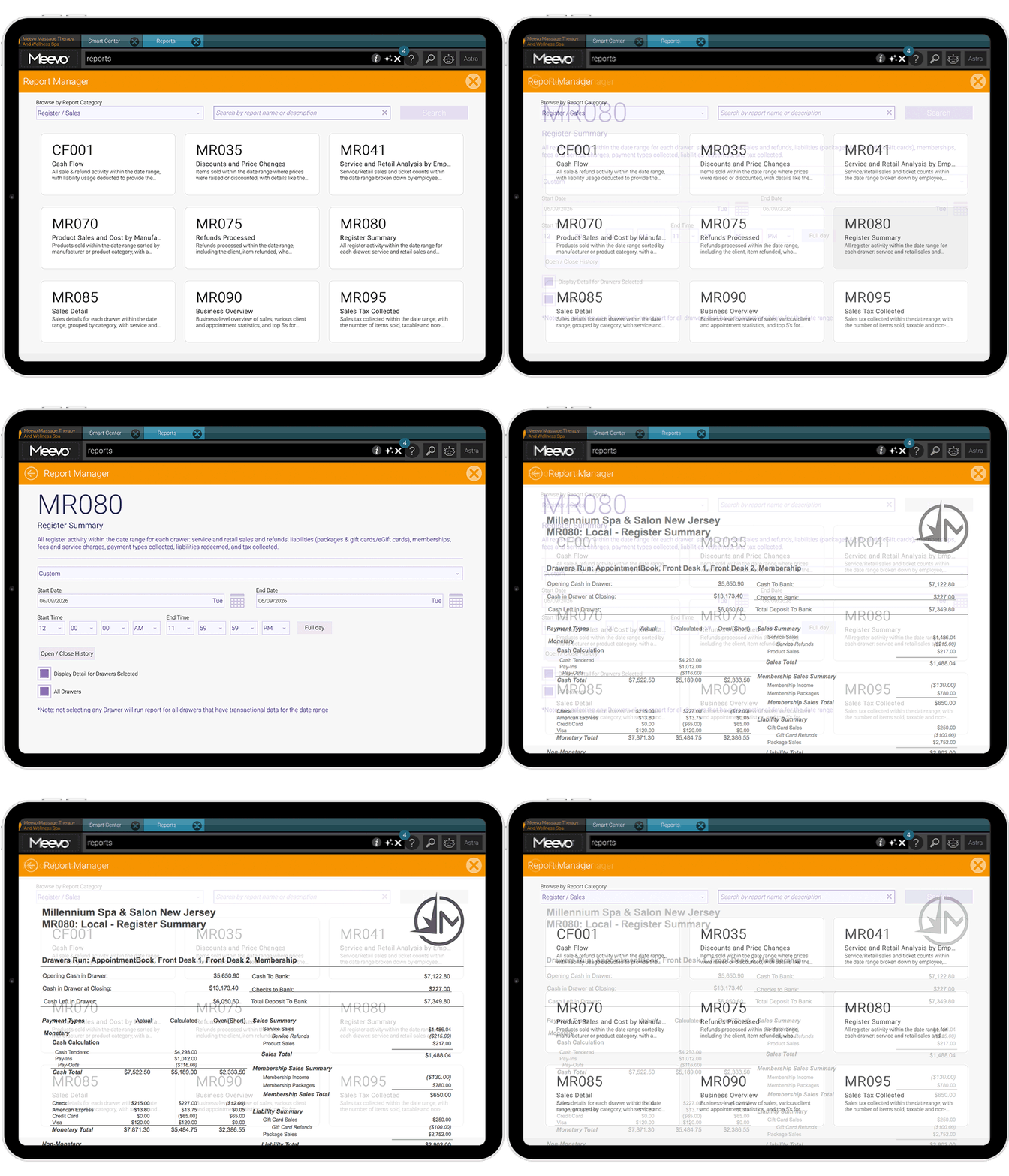
- You can see how a stylist is really performing on a single report. It pulls their whole picture into a single view (new clients per month, new client retention, repeat client retention, frequency of visits, average ticket, and productivity), so you’re not running six separate reports to get it.
- Missed Opportunity tracking is another report that logs wait-listed clients you didn’t end up booking. That way, you can see what those gaps cost you in revenue and have a list of clients to follow up with.
- The Smart Center dashboard shows your key metrics in real time the moment you log in, and you can customize what each role sees. An owner might track today’s bookings and total sales, while your front desk sees the wait list, clients rebooked today, and how full the schedule is.
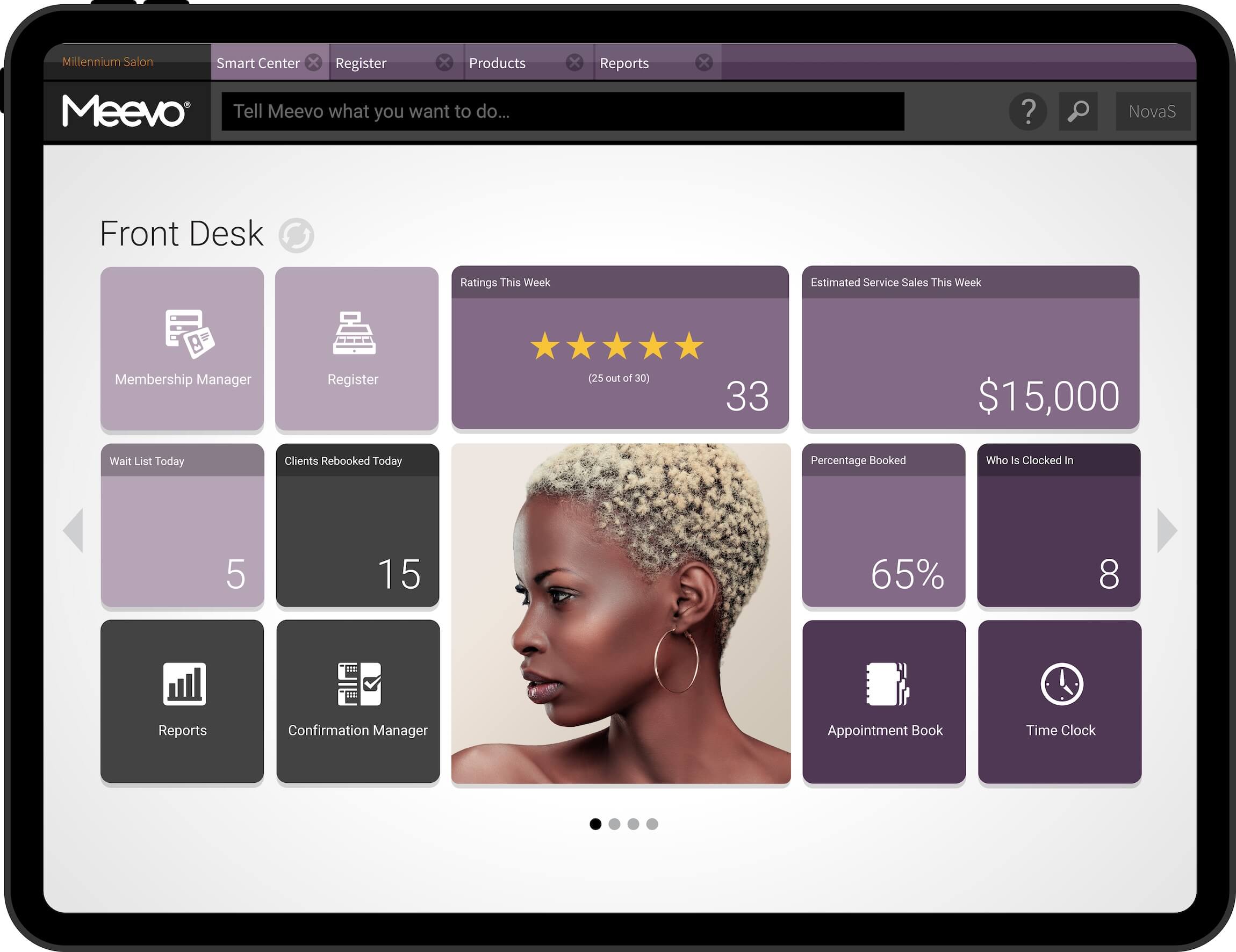
- Advanced Dashboards turn your numbers into easy-to-read charts and graphs that track how your business is doing over time. For example, a sales chart by service shows which services bring in the most money and which may have dropped off. A standard report can give you the numbers, but you still have to know what to look for and compare to identify those trends.
- The Meevo Business Intelligence (BI) app lets you check on the business without logging into the full platform. You get 20+ KPIs right on your phone, and you can compare them across date ranges or locations. (Premier tier)
This level of reporting detail is especially valuable for established salons. It gives you the information you need to make confident decisions about staffing, pricing, marketing, and client retention, instead of relying on instinct or reports that only show part of the picture.
Staff and Inventory Management
Meevo handles staff scheduling, time tracking, payroll, and inventory management in the same system as the appointment book and checkout. Hours worked and products sold feed payroll and stock counts on their own, so most of the manual entry disappears, and the numbers stay accurate.
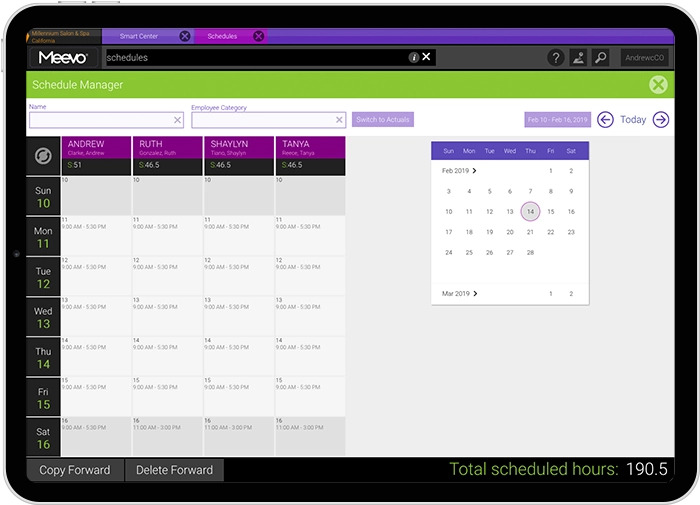
- A built-in time clock prompts staff to clock in when they arrive and out when they leave, and those hours go straight into payroll.
- Payroll handles whatever pay structure you use, including hourly, salary, commission, tiered and sliding scales, multiple rates for one person, and commission overrides on services, retail, packages, and memberships. ADP connectors let you submit payroll without leaving Meevo.
- You can set goals for each employee, like a 75% rebook rate or a $100 average ticket, and their progress shows on their Smart Center every time they log in. Seeing the number daily does more for performance than hearing it at an annual review.
- The MyMeevo app puts schedules on staff phones, where they can check appointments and request time off without going through the front desk. (Premier tier)
- Every sale updates the count in real time for retail shelves and back bar.
- Staff log products by scanning barcodes from a mobile device, and multi-size products get entered once with all their variants on one screen.
- Meevo builds your purchase orders for you. It knows your stock levels and learns how fast each product moves, so you’re prompted to reorder before you sell the last unit, and you’re not over-ordering things that expire on the shelf.
Marketing Tools
Meevo’s marketing tools create campaigns right from your client records, so lists build themselves, and you’re targeting people by what they’ve actually booked. The tools also help you handle the side of marketing that happens on outside platforms.
- Email and text marketing come with all Meevo plans, and both allowances grow with your tier.
- Email marketing comes with hundreds of pre-written industry templates and an AI assistant that can help you draft or rewrite your copy. You can track open, click-through, and bounce rates on everything you send.
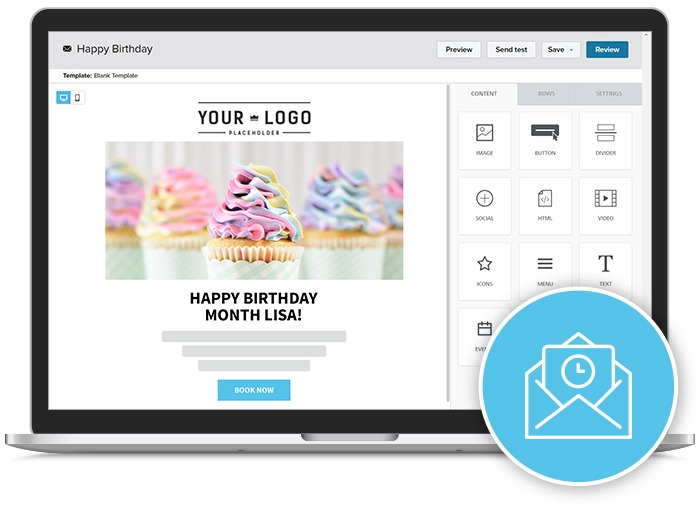
- Meevo keeps your client data synced to marketing, so you can quickly build the groups you want, such as loyalty members, birthdays this month, or clients who haven’t been in for a while. You can email a group whenever you want, or schedule a campaign that repeats on its own.
- Online Presence Management updates your business listings across platforms like Google, Yelp, Facebook, and others. One change to your hours, services, or business information updates everywhere at once. (Essentials tier and up)
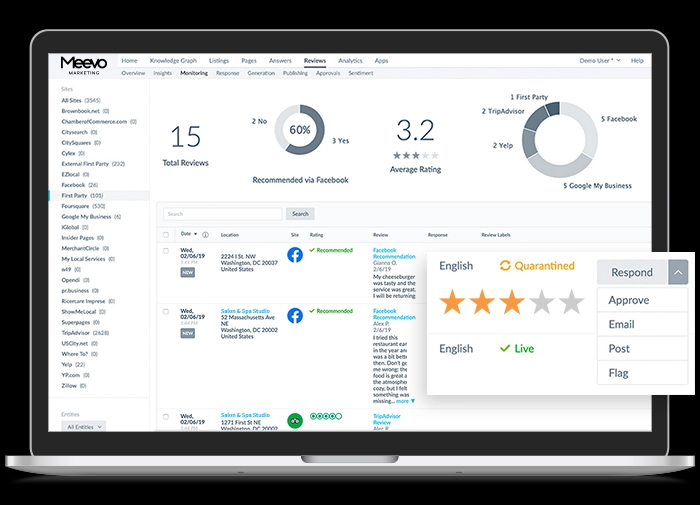
- Meevo brings reviews from different sites and locations into one dashboard. An AI assistant can draft responses in your brand’s voice, and you can request new reviews from clients without leaving the platform. (Essentials tier and up)
- You write and schedule posts for your social profiles in one place, on a calendar that lets you plan weeks ahead.Each post shows how it will look before it publishes. You can answer comments from the same screen using AI assistance or replies you’ve saved. (Essentials tier and up)
Onboarding and Support
Meevo is set up to make the transition from your previous software as smooth as possible, with a dedicated team that handles the migration and trains your staff. That help continues after launch, from a support team with a 98.5% customer satisfaction rating.
- An Implementation Specialist guides your team through the setup based on how your business actually operates, rather than following a generic checklist. Meevo migrates your client records, appointment history, retail inventory, and other business data from your previous system. The team also cleans up duplicate or outdated records during the process.
- Before launch, your team can practice using Meevo with a sandbox loaded with your own business data. While using it, you can also verify that everything transferred correctly before anyone works with live client records.
- Ongoing support is US-based and available by phone and live chat Monday through Friday from 8 a.m. to 8 p.m. ET and Saturdays from 9 a.m. to 5:30 p.m. ET.
- Interactive walkthroughs and role-based courses are built into the platform to guide staff through unfamiliar tasks. You have 24/7 access to these resources.
Reviews From Real Users
-
“Since we started with Meevo, we took our prebook rate from 19% up to 83%—that’s one of the things that really sticks out in my mind. Having that ability to measure with Meevo, just at our fingertips, is so effective.”— Christi Newell, Co-Owner of A Glo Salon & Spa
-
“There has been an increase in revenue, just by being able to pull reporting really quickly and have conversations super quick. We’re able to speak to behaviors a lot quicker with our team to drive the results that we need.”— Meaghan Reilly, District Manager for Woodhouse Spas
-
“Meevo took their time with our service staff, our concierge team, our management, and walked us through every step. We’re so surprised at how quickly we adapted to this new software.”— Jordan Becker, CEO & Creative Director at Interlocks Salon
Looking for software that actually fits how a busy salon or spa runs? Book a Meevo demo to learn more.
Vagaro: A Broad Wellness Platform for New Businesses Building a Client Base
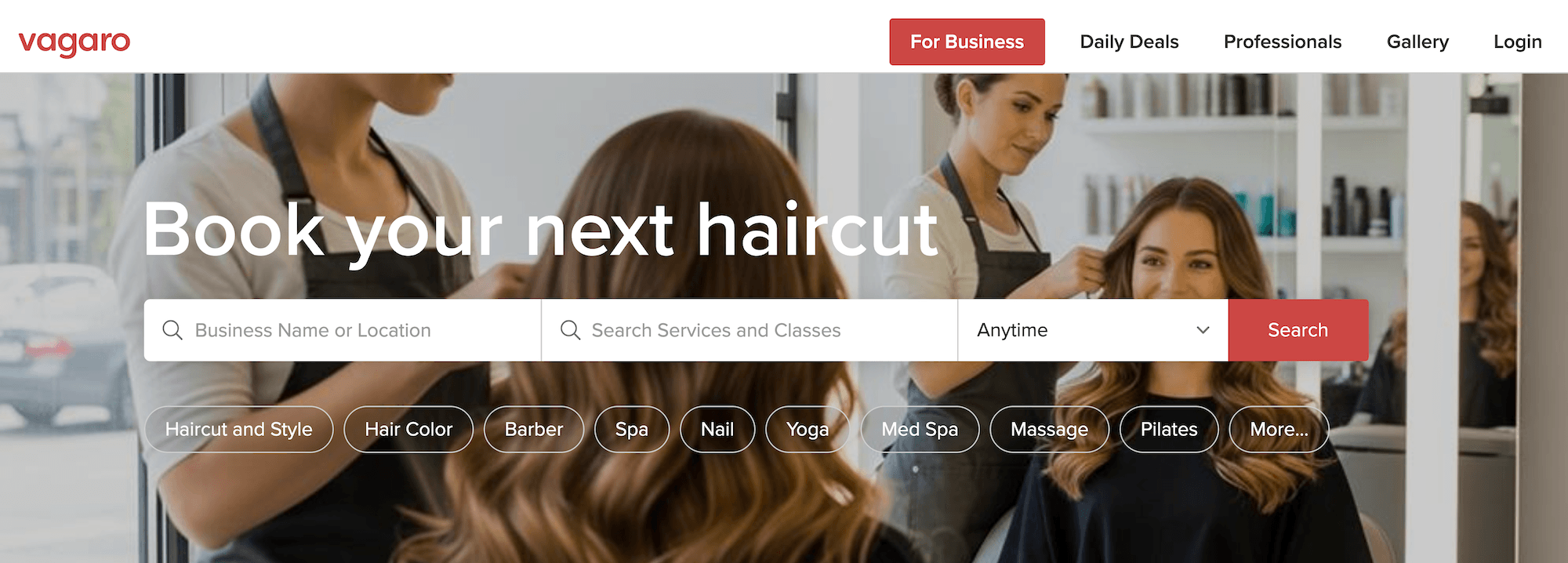
Vagaro is a business and client management software that serves salons and spas, plus several other types of businesses, including gyms, yoga studios, mental health clinics, and dog groomers. This broad approach gives it flexibility, but it also means some features are built for a wider range of businesses rather than tailored specifically to salon and spa operations.
It’s known for its consumer marketplace, a searchable directory where potential clients browse nearby businesses and book appointments. For new, smaller teams, this built-in visibility can be an advantage because it helps potential clients discover and book with your business.
Visibility like this can also work against an established salon. Your regulars rebook through that same marketplace, and every visit there shows your competitors next to you, often with introductory deals attached.
Pricing
Vagaro’s pricing is à la carte. The base plan is $23.99 per month and covers one provider’s calendar at one location, plus the daily basics: marketplace booking, reminders, a wait list, memberships, basic inventory, standard reports, and a monthly email allowance.
Each additional provider’s calendar costs $10 a month, up to seven calendars total. Past that, you can add staff without paying more. Most features beyond the basics are their own monthly add-on.
- Branded website: $20/month
- No-show protection: $10/month
- Client self-check-in app: $10/month
- Text marketing: $20/month for 1,000 credits
- Payroll: $34/month plus $5 per employee
- Advanced reporting: $40/month
- Branded mobile app: $100/month, plus a $100 one-time setup fee
If you’re renting a booth and just getting started, you might not need all these features. But if you’re a salon with five stylists using no-show protection, text marketing, advanced reporting, and payroll management, you’ll end up paying about $193 a month with these add-ons (compared to Meevo’s $129).
Booking
Vagaro’s booking tools cover the main parts of managing appointments, from scheduling to client communication.
- Clients can book any time of day from the Vagaro Marketplace, a widget you can embed on your own site or your social listings. They rebook and manage those appointments in Vagaro’s consumer app, under Vagaro’s branding rather than yours (unless you add on a branded website for $20/month or a branded app for $100/month plus a $100 setup fee).
- Clients get appointment reminders by text, email, or push notification, though you can’t customize the wording on text reminders.
- The color-coded, drag-and-drop calendar syncs with Google Calendar. You set how long a time slot runs and how much notice a client has to give when booking online. It also covers group and couples appointments, class rosters, and any room or equipment a service ties up.
- The Check-In App turns a tablet (not included) into a self-check-in kiosk at the front desk for $10 a month. Clients scan a QR code or look up their name, and their service provider gets a notification that they’ve arrived.
- Deposits and no-show fees on online bookings are part of the Online Shopping Cart add-on ($10/month).
- The wait list can text clients on its own when an appointment slot opens, or your staff can work it manually. A setting called Money Maker sends that opening to the highest-paying wait-listed client first.
Payments and POS
Vagaro processes payments itself through its own merchant services, though you have the option of using a third-party processor if you choose. New accounts on Vagaro Merchant Services get one basic card reader free.
- Checkout pulls data from the calendar, so a client’s services and any products they’re buying are already at the register. Clients can pay using Apple Pay or Google Pay, in addition to all major credit cards.
- Staff collect tips at checkout, and the service provider receives them on the regular payroll cycle.
- There is no offline mode. This means that when the system goes down, the calendar, client notes, and payment processing go down together until service returns. Downtime issues consistently come up in Vagaro user reviews.
- Vagaro leaves most of the chargeback work to you. The dispute tool opens an eight-day response window, and if you let it close, Vagaro files a rebuttal built from whatever evidence is already on file.
Client Retention and Memberships
Retention tools come with Vagaro’s base plan, though automatic membership billing only runs if you process payments through Vagaro Merchant Services rather than an outside processor.
- Memberships bill the client’s card on file on the cycle you set. You can run them monthly, quarterly, or yearly, or tie them to a set number of completed visits.
- Clients can buy memberships and packages themselves from your Vagaro listing page, your branded website, or the check-in tablet. Vagaro also suggests a membership when a client books a service that a membership would cover.
- Membership discounts apply automatically at checkout. Covered items show a membership icon at the register, and staff can remove the benefit if the client wants to save it for another visit.
Reporting
Vagaro includes basic reporting, but advanced reporting is an add-on.
- The base subscription includes roughly 30 reports, spread across six categories: sales, appointments, clients, inventory, staff, and billing and messaging.
- Data Lake is Vagaro’s advanced reporting add-on, at $40 a month. It opens up access to your raw data and a Microsoft Power BI template carrying more than 50 prebuilt reports. Anything past those templates means someone on your team works in Power BI directly to chart and slice the data on their own.
- Vagaro includes a built-in retention report that shows whether clients are coming back after their first visit. It treats any repeat visit as retention, no matter how long ago the first one was, so someone who books monthly and someone who last came in two years ago both land in the same bucket.
- You can set a reporting dashboard to open when staff log into the platform, withwidgets that cover things like sales breakdown and booking percentage. The dashboard is not customizable for individual team members, which means everyone sees the same setup.
Staff and Inventory Management
Staff scheduling and inventory are both part of the base subscription.
- Every provider has a calendar of their own, showing the hours they work, which services they’re qualified to perform, and any time off blocked out. Permissions run by role, and hourly staff clock in and out on a timecard that feeds payroll directly.
- Payroll reporting comes with the platform and runs on the commission rules you set, whether that’s a straight percentage, a flat dollar amount, or a blend, and rates can differ by service or product. Actually paying staff requires the Vagaro Payroll add-on ($34 a month, plus $5 per employee).
- When a product sells at the register, Vagaro automatically subtracts it from inventory. You get an alert when something runs low, and there are tools for checking your counts against what’s physically on the shelf.
- Vagaro suggests how much of each product to reorder based on how fast it’s been selling, and filters let you build the order without clicking through every item.
Marketing Tools
Vagaro’s marketing is built around the Vagaro Marketplace, with email included and texting sold by the credit.
- Daily Deals put a discounted offer in front of people browsing the Marketplace, which can help you book clients. Vagaro reviews each deal first, then takes a cut of every redemption (20% for a brand-new client and 5% for an existing one).
- The base subscription includes 1,000 marketing emails a month. Bigger plans begin at $10 a month for 5,000 and reach $90 for 100,000. Text marketing is not included and starts at $20 a month, which buys 1,000 credits.
- Vagaro can send automated email or text campaigns tied to a client’s visit (such as messages before and after appointments). For example, Lost Customer campaigns email or text clients who haven’t returned in a set amount of time. You choose the wait time, up to 24 weeks after a client’s last visit.
Onboarding and Support
Onboarding is pretty quick, since Vagaro is a lighter system that gives you less to set up. Ongoing customer support is advertised around the clock, though a chat starts with Vagaro’s AI assistant before it reaches a person.
- The Imports and Onboarding team moves your data over across three sessions. The setup call typically lasts under an hour, and the transfer itself takes anywhere from a day to three. Every account gets one premium import at no charge.
- Training happens through self-paced tutorial videos and live online workshops. One-on-one training is not included and costs $100 per session.
Reviews From Real Users
-
“Vagaro has a fairly easy interface for clients and providers alike. There are so many features to help keep your business flowing and increase visibility. I particularly love how seamlessly my website integrates with my booking site. The pricing is still something that I struggle to accept…While the à la carte model is beneficial, the features that are optional I find are necessary to add, and it increases the pricing exponentially.”— Arne S, Health, Wellness and Fitness Esthetician
-
“Overall, I’ve had a very positive experience with the software and would recommend it to many people. However, I don’t think it is the most suitable product on the market for my company, at the moment – particularly for schedule and appointment management, inventory, and online booking. As a natural hair care salon, I feel like the software makes it evident that the company does not understand our workflows and how they differ (significantly) from cut/color salons. As much as I love the software, this weakness really creates pain points that can’t be overlooked or ignored.”— Ty E, Health, Wellness, and Fitness Owner
-
“I like the multiple features and options when it comes to scheduling, credit card deposits, calendar merging features, and organizing my business. What I dislike most is paying a monthly subscription to drive clients to my website, only for those clients to then be shown other salons in my area that are also paying for the same platform. I appreciate the features Vagaro offers, but this creates a frustrating experience for business owners trying to build their own brand and customer base.”
Square Appointments: Cross-Industry Software for Solo Providers and Small Teams
Square Appointments is the booking side of Square, the company that also runs point-of-sale for service businesses. Beauty and wellness is one of many industries it serves (alongside restaurants, retail, and more), so its tools are designed to cover the core needs of lots of business types rather than offer the deeper, industry-specific features of salon and spa platforms.
Square Appointments is a good fit for solo providers and small businesses. Its base plan is free, removing the cost barriers for those just starting out. Also, at that size, the business needs are lighter, so less in-depth tools are usually enough.
Pricing
Square Appointments offers a free plan that includes the POS and payment processing, a booking website, unlimited staff calendars, text and email reminders, and deposits at booking. You only pay processing fees on what you take in.
Square Plus costs $49 a month and adds cancellation policies and no-show fees, a waitlist, multi-staff bookings, class booking, prepaid packages, and Google Calendar sync. Email and text marketing also start at this tier, along with team sales reporting and inventory tools.
Square Premium is $149 a month and adds resource management for rooms and chairs, shift scheduling with time-off requests and trades, commission rates, and custom permission sets. It also unlocks more detailed reporting and 24/7 customer phone support.
It’s worth noting that Square began as a card reader and a payment processor. The booking and other CRM-style tools came later, built to serve every industry it sells to. Moving up a tier does add more tools, but they’re still not designed specifically for salons or spas.
What that looks like day-to-day is a general version of the thing a salon would otherwise get purpose-built. For example, Square has no membership feature, which many salons and spas lean on for steady monthly revenue.
Booking
The free plan covers booking itself, while the tools that protect a schedule start at the paid tiers.
- Online appointment scheduling happens through a Square booking site, a Book Now button on social platforms, an embedded widget on your own site, or SquareGo (Square’s consumer booking app). The booking site carries your name and logo, though putting it on your own domain requires Plus.
- Staff calendars are unlimited on every plan. You can color-code them by staff or by service, set each person’s availability, and block off personal time. The calendar is drag-and-drop on desktop and mobile.
- Text and email reminders come with every plan, though customizing the wording is email-only until you reach Plus. Square Assistant lets a client reply to an automated reminder text to confirm, cancel, or reschedule, and the calendar updates on its own.
- Deposits and prepayments come with the free plan.Cancellation policies and no-show fees start at Plus, which is also the tier that lets you hold a card at booking.
- The wait list is partially automated (and starts at Plus). Clients add themselves through your booking site, and Square sends the notification when an opening appears. Then, your front desk picks it up from there to book the slot and confirm.
Payments and POS
Square built its business on payments, and the processing is its own rather than a third party’s. It comes with every plan, so there’s no separate merchant account to arrange. Tap to Pay on an iPhone or Android phone lets you take cards without hardware. New accounts can claim one free magstripe reader, which handles swipes only. A reader that takes chip and contactless cards starts at $59.
- Checkout works with all major credit cards, Apple Pay, Google Pay, and Cash App Pay. Afterpay is available as well, letting clients buy now, pay later (in four installments), while you receive the full amount up front.
- Offline payments come with every plan. Square runs them once you’re back online, though it declines anything older than 24 hours.
- Tips can be collected at checkout on any plan, though setting commission rates is a Premium feature.
Client Retention and Memberships
Square has pieces of a retention program, but the tools reward visits a client already makes rather than committing them to future ones, and they sit behind the paid tiers.
- Square has no membership feature. Some businesses use a workaround by charging clients on a schedule through recurring invoices or a subscription plan on a Square Online site, though neither connects to member benefits. Tracking what a plan includes and applying it at checkout remains manual labor for staff.
- Square loyalty programs run on points, with rewards and one-time or recurring bonus promotions, and start at Plus.
- Prepaid packages let clients buy a series of services up front, with the value automatically applied as they redeem them. This feature starts at Plus.
Memberships are how many salons and spas build predictable revenue, so an established business will likely notice this gap.
Reporting
Square’s reports primarily answer questions about sales. The ones that do answer questions about your clients and your stylists sit at the Premium tier.
- Every plan includes the standard sales reports, covering sales summaries and trends, item and category sales, discounts and voids, taxes and fees, transaction history, gift cards, disputes, and cash drawers.
- Custom Report Builder lets you build your own reports, starting from one of Square’s presets or from a blank one. You pick the metrics, group the results by team member, location, or item, add filters, and save it to run again. You have to know what you want to measure, since the builder won’t point you toward what matters for a salon.
- The reports that measure staff and salon performance sit behind the paid tiers. Team sales reporting starts at Plus. Premium adds labor cost reporting, which weighs hourly pay against net sales, along with future bookings, back bar cost per service, and a team performance report.
- Inventory and marketing reportsstart at Plus. Inventory covers aging stock, cost of goods sold, and sell-through, so you can see what’s sitting and what’s moving. Marketing shows what a campaign brought in.
Staff and Inventory Management
Square handles staff and inventory management through tools designed for a wide range of businesses. It covers essentials like time tracking, employee permissions, and retail inventory, but it is not built around salon-specific processes.
- Each service provider’s working hours live on their own calendar. Time tracking starts at Plus, and publishing a team schedule, approving time off, setting commission rates, and controlling what each role can see all require Premium.
- Paying staff requires Square Payroll,an add-on that costs $35 a month plus $6 per staff member.
- Inventory tracking comes with every plan, including creating items and SKUs by scanning a barcode or importing a catalog in bulk, plus low-stock alerts. Vendor records, purchase orders, unit costs, and inventory history start at Plus, and transfers between locations are Premium.
Marketing Tools
Square’s marketing works off the client list checkout builds, sending email and text campaigns to segments of it.
- Email campaigns go out to segments of your client list, either once or on a schedule, using templates you can edit. They start at Plus, with no cap on volume. Text campaigns are included on the paid tiers, with 500 messages a month included on Plus and 2,500 on Premium.
- Automated campaigns send on their own based on a client’s history, like a first visit, a birthday, or a long stretch without an appointment. This feature starts at Plus.
- You can create coupon codes on any plan. From Plus up, a receipt can also carry a coupon, a business announcement, or a gift card.
- Google reviews show up in the Square dashboard when you connect your Google Business Profile (available on any plan).
Onboarding and Support
Setting up Square Appointments is a do-it-yourself job, and how much live support you get depends on your plan.
- You set Square up yourself, importing clients from a CSV file and bringing over your service list, though existing appointments have to be entered by hand. A specialist can take on a fuller migration, including appointment history (contact sales for more information).
- Chat and email are available on every plan. A chat opens with Square’s automated assistant, and you can ask for a live person.
- Phone support is limited on the free tier, available from 6 a.m. to 6 p.m. Pacific on weekdays, and only for your first 90 days. Plus allows you to keep those hours permanently, and Premium support is 24/7.
Reviews From Real Users
-
“For the most part, it’s easy to use and has been the benchmark by which all other platforms measure their offerings to their clients. Although there is great progress and development within Appointments, there are still some VERY key features (BASIC NECESSITIES) that have been HIGHLY sought after for years, and they’re still not implemented.”
-
“Square Appointments is an easy way to have my clients book. Easy to navigate and user-friendly. It doesn’t offer as many features as other appointment-setting applications. However, it works for what I need it to do.”— Cardi G, Sales & Retail
-
“What I like about Square Appointments so far is how simple and organized it makes the entire booking experience, both for the business and our clients. I would say that when having larger teams, customization options can be limited with the schedule.”— Milagros G, Individual and Family Services
Book a Meevo demo to see how our software automates the work your front desk is doing manually, raises your average ticket, and shows you which stylists and services are actually making money.